Brand Voice
Define your brand's tone, style, and content rules so every piece of AI-generated content sounds authentically yours.
What is brand voice?
Brand voice controls the tone and personality of all AI-generated content — product descriptions, blog posts, meta tags, and image alt text. A well-configured brand voice ensures consistency across your entire store.
Voice presets
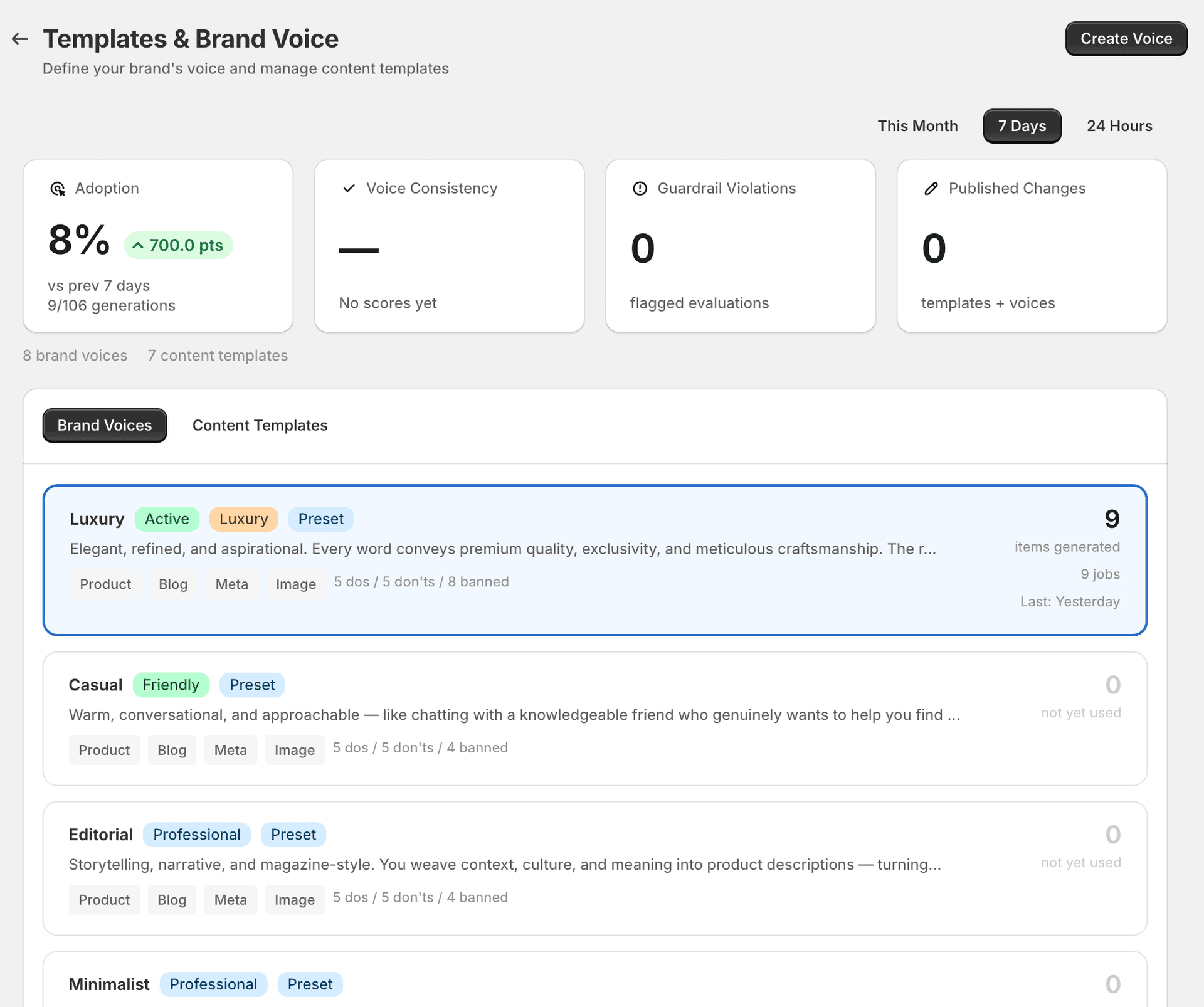
SitePx ships with eight ready-to-use voice presets. Each preset defines a complete voice profile including dos, don'ts, and banned words. Pick the one closest to your brand and customise from there.
| Preset | Tone | Best for |
|---|---|---|
| Luxury | Elegant, refined, aspirational | Premium fashion, jewellery, high-end homeware. Every word conveys exclusivity and meticulous craftsmanship. |
| Casual | Warm, conversational, approachable | Lifestyle brands, general retail. Like chatting with a knowledgeable friend who genuinely wants to help. |
| Editorial | Storytelling, narrative, magazine-style | Fashion, food, design brands. Weaves context, culture, and meaning into product descriptions. |
| Minimalist | Brief, clean, essential | Modern design, tech accessories. Every word earns its place — maximum value with minimum words. |
| Playful | Fun, energetic, engaging | Kids' products, novelty items, gifts. Brings a spark of joy with creative language and unexpected turns. |
| Premium Service | Attentive, bespoke, white-glove | Luxury services, concierge-style brands. Makes every customer feel like the only customer. |
| Professional | Clear, authoritative, confident | B2B, tools, business supplies. Establishes expertise through precise, well-structured language. |
| Technical | Precise, data-driven, specification-focused | Electronics, hardware, equipment. Provides detailed technical information that respects the reader's intelligence. |
Voice configuration
Each voice profile includes detailed configuration across content types:
- Content scope — which content types the voice applies to: product descriptions, blog posts, meta tags, and image alt text.
- Dos — 5 positive guidelines defining what the voice should do (e.g. “Use sensory language that lets readers feel the product”).
- Don'ts — 5 negative guidelines defining what to avoid (e.g. “Never use generic superlatives like ‘best’ or ‘amazing’”).
- Banned words — specific words the AI must never use, typically 4–8 words depending on the preset.
Setting up your brand voice
Go to Brand Voice
Open the Brand Voice section from the SitePx navigation.
Choose a preset or create new
Pick the preset closest to your brand, or click “Create New” to build a voice profile from scratch.
Customise the voice
Click into any voice to edit its dos, don'ts, banned words, and content scope. Adjust the formality level, sentence length preference, and vocabulary to match your brand.
Set as active
Mark your preferred voice as active. Only one voice can be active at a time — this is the voice used for all new content generation.
Test your voice
Use the voice test tool to generate sample content and see how your brand voice sounds. Tweak until you're satisfied.
Voice consistency score
SitePx measures how consistently your content matches your configured brand voice. Each piece of generated content gets a voice score (0–100). Content scoring below 70 is flagged for review.
The score considers:
- Tone alignment
- Vocabulary match
- Formatting adherence
- Guideline compliance
Usage tracking
Each voice profile shows usage statistics so you can see how much content has been generated with it:
- Number of items generated
- Number of jobs run
- Last used date
This helps you understand which voices are actively in use and which are available for experimentation.
Note
Guardrails and governance
Brand voice profiles include guardrails that prevent:
- Off-brand language
- Competitor mentions
- Claims that could create legal issues
- Content that deviates too far from your guidelines
Governance events are logged so you can audit what was generated and why. See Content Templates for how templates work alongside brand voice.